opencodeCLI
OpenCode Walkthrough
A Visual Studio Code extension that provides an interactive walkthrough and quick actions for OpenCode, an AI-assisted CLI for software engineering tasks.
Publisher: AlejandroAdorjan | License: SEE LICENSE IN LICENSE | Pricing: Free
Website: aadorian.github.io/opencodeCLI · Install: VS Code Marketplace
Browse screenshots, install steps, and documentation on the project website.
Demo
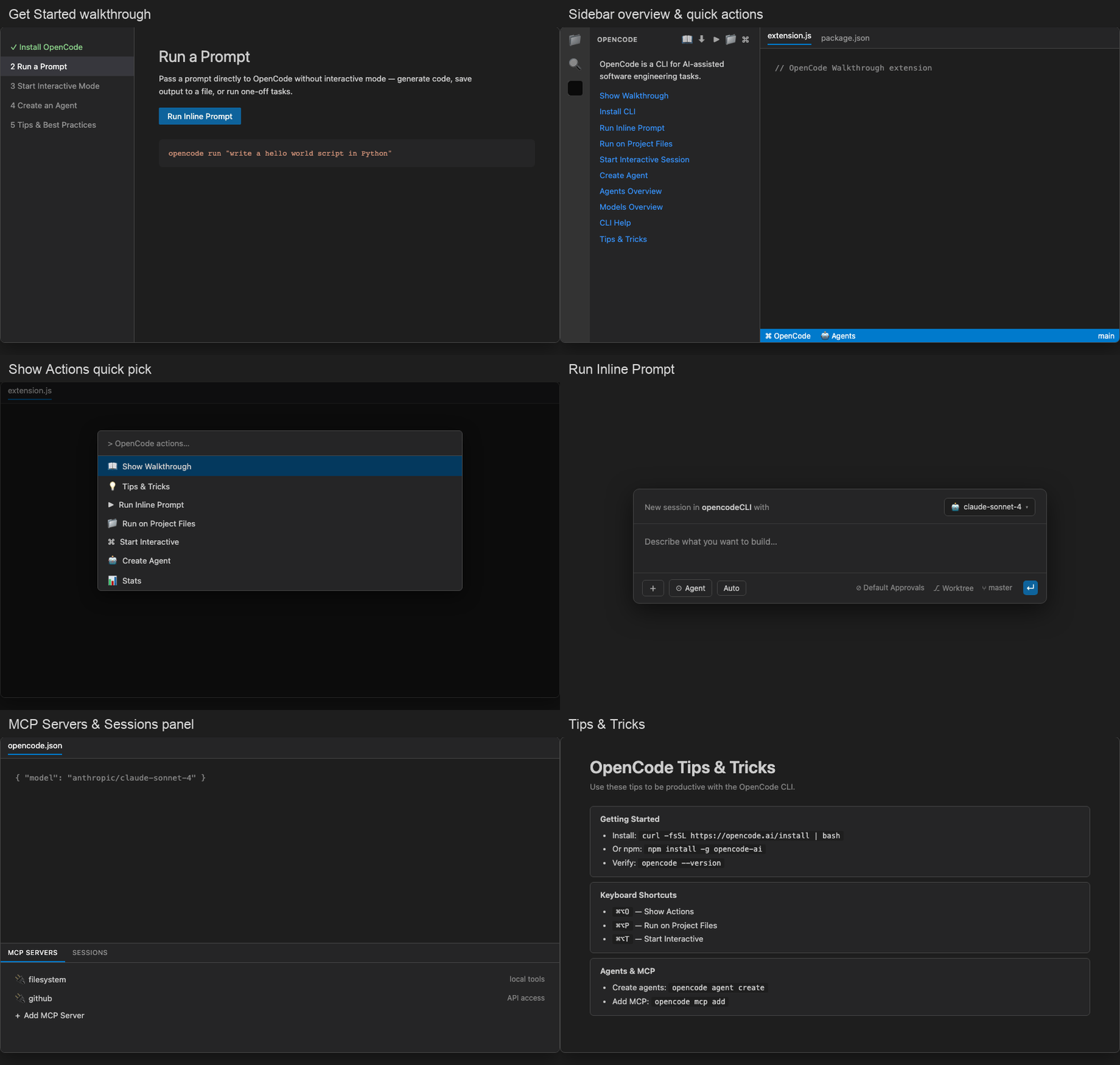
Screenshots
Each image below matches the extension UI in VS Code — sidebar links, toolbar buttons, quick picks, and panel actions as shipped in v0.0.2.
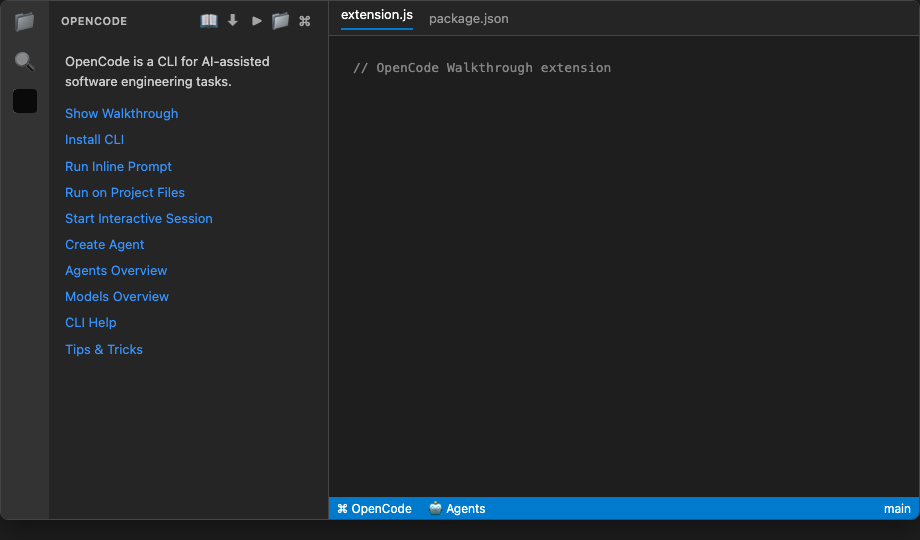
Activity bar & sidebar overview
Open the OpenCode activity bar view for one-click access to walkthrough, CLI, and overview panels.
Welcome links shown:
- Show Walkthrough · Install CLI · Run Inline Prompt · Run on Project Files
- Start Interactive Session · Create Agent
- Agents Overview · Models Overview · CLI Help · Tips & Tricks · Read Documentation
Status bar: $(zap) OpenCode (Show Actions) · $(hubot) Agents (List Agents)
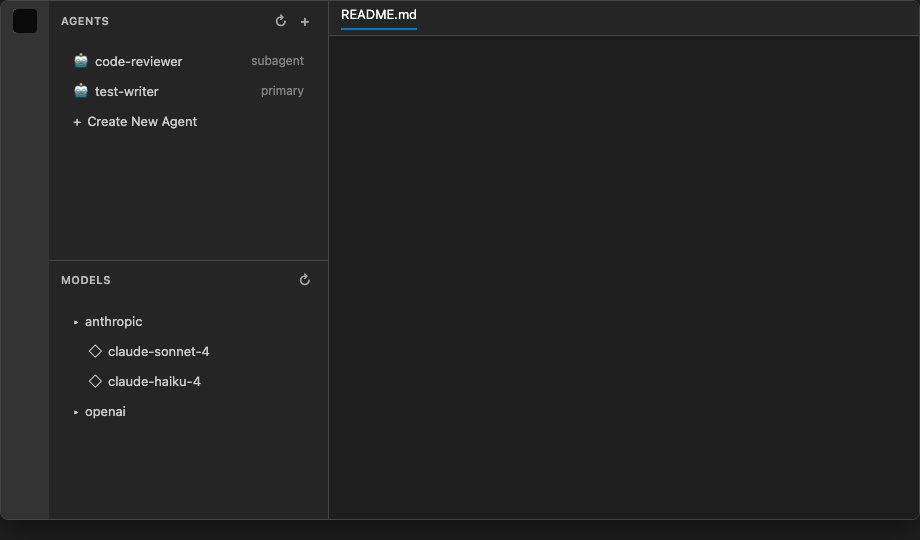
Agents & models tree views
Live data from opencode agent list and opencode models in the sidebar.
Agents view: code-reviewer (subagent), test-writer (primary), Create New Agent
Models view: provider groups (e.g. anthropic → claude-sonnet-4, claude-haiku-4), refresh toolbar
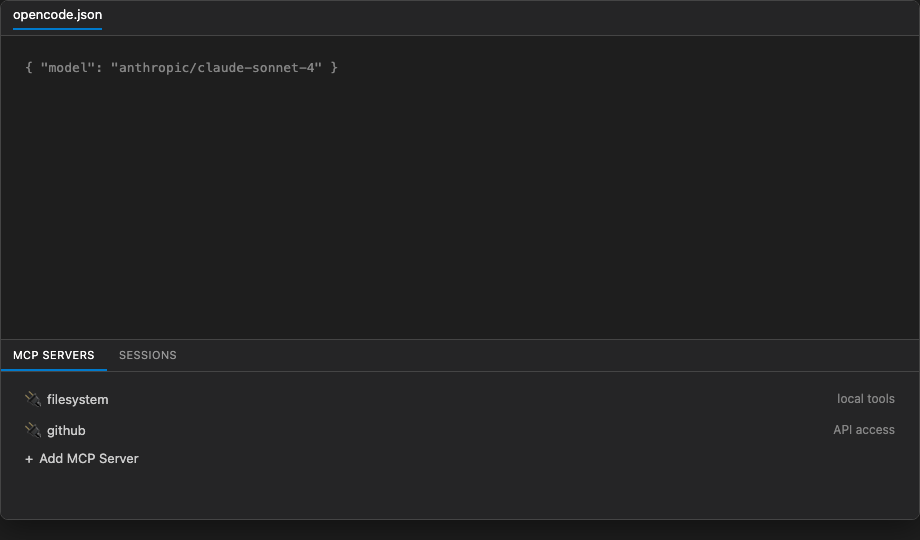
MCP servers & sessions panel
Bottom panel container MCP Servers with two tabs.
MCP Servers tab: listed servers (e.g. filesystem, github) · Add MCP Server
Sessions tab: recent sessions · refresh toolbar · empty-state links to Run Inline Prompt / Start Interactive Session
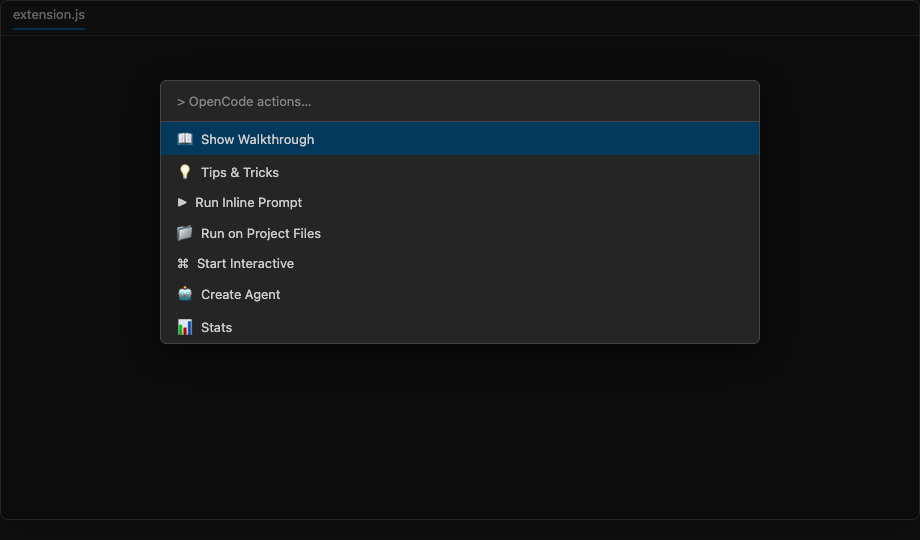
Show Actions quick pick
Open from the status bar (⌘⌥O on macOS) or command OpenCode: Show Actions.
Quick pick entries (partial list shown in UI):
- Show Walkthrough · Tips & Tricks · Run Inline Prompt · Run on Project Files
- Start Interactive · Create Agent · Stats
Full menu also includes Install CLI, Agents/Models overview, Auth Login/List, MCP add/list, List Models/Sessions, Start Server, Start Web, and Upgrade CLI.
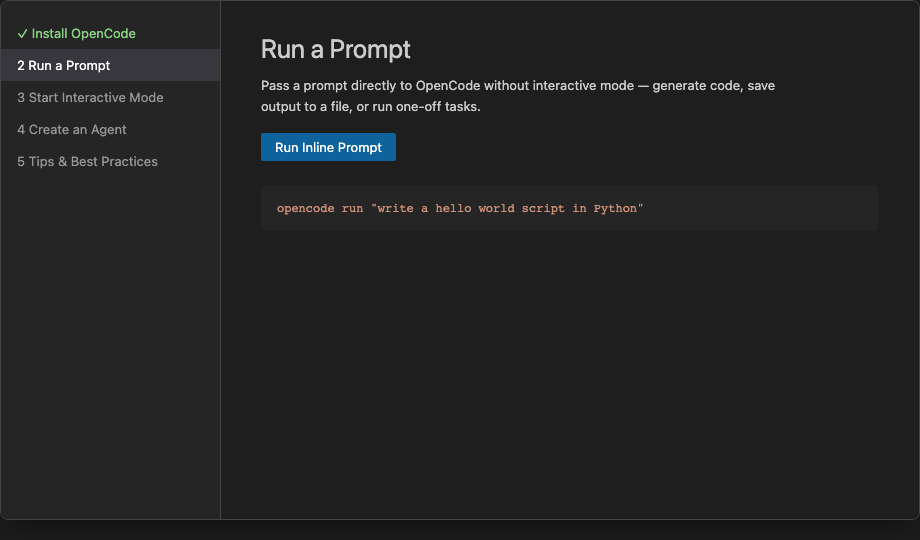
Getting Started walkthrough
Built-in walkthrough Get Started with OpenCode (opencode.gettingStarted).
Steps: Install OpenCode · Run a Prompt · Start Interactive Mode · Create an Agent · Tips & Best Practices
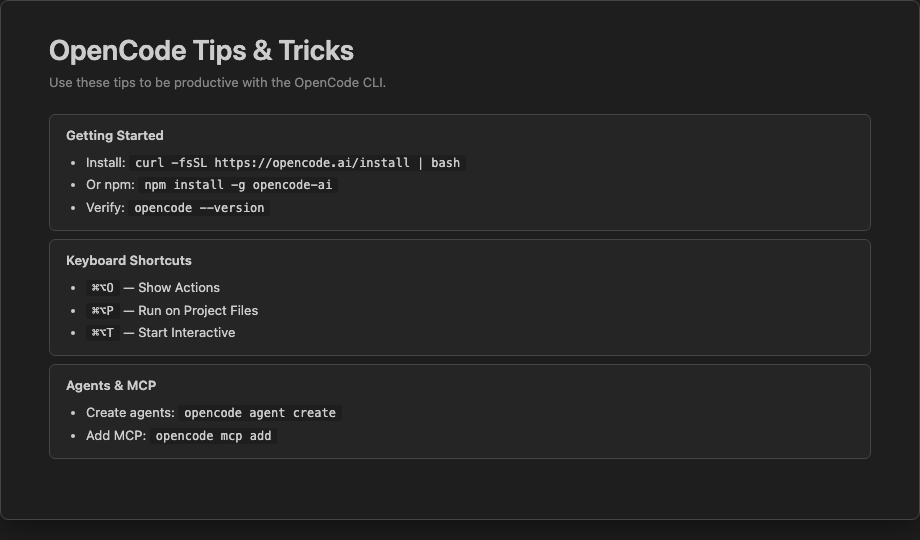
Tips & Tricks webview
In-editor reference panel opened via OpenCode: Tips & Tricks.
Sections shown: Getting Started (curl -fsSL https://opencode.ai/install | bash) · Keyboard Shortcuts (⌘⌥O, ⌘⌥P, ⌘⌥T) · Agents & MCP (opencode agent create, opencode mcp add)
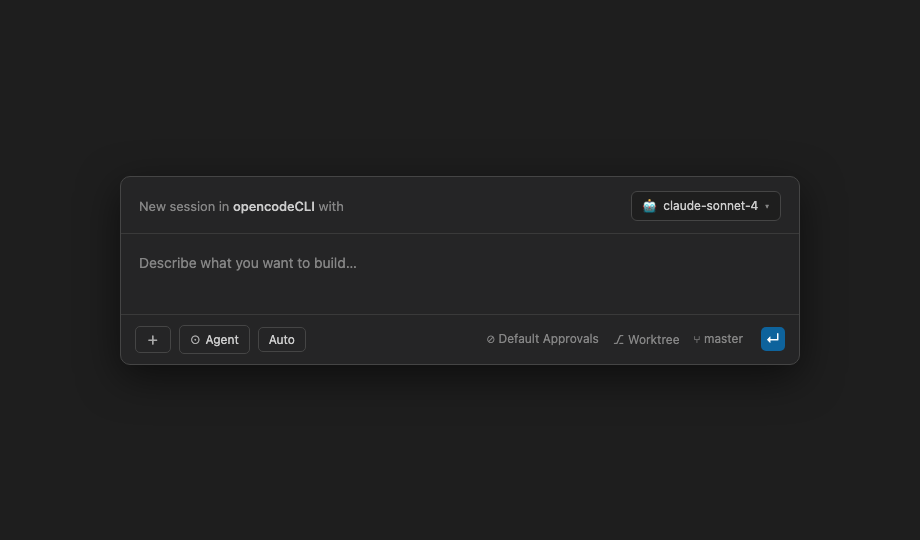
Run Inline Prompt dialog
Command OpenCode: Run Inline Prompt (⌘⌥I) — opens a session dialog where you describe what you want to build, pick a model, and run the prompt directly from VS Code.
Dialog: workspace context (e.g. opencodeCLI) · model selector (e.g. claude-sonnet-4) · prompt text area · agent mode · worktree / branch info
Run on Project Files
Command OpenCode: Run on Project Files (⌘⌥P) — pick workspace files, enter a prompt, run in the integrated terminal.
Dialog: branch context (e.g. main) · file count · prompt input (e.g. “Refactor these files to use async/await”)
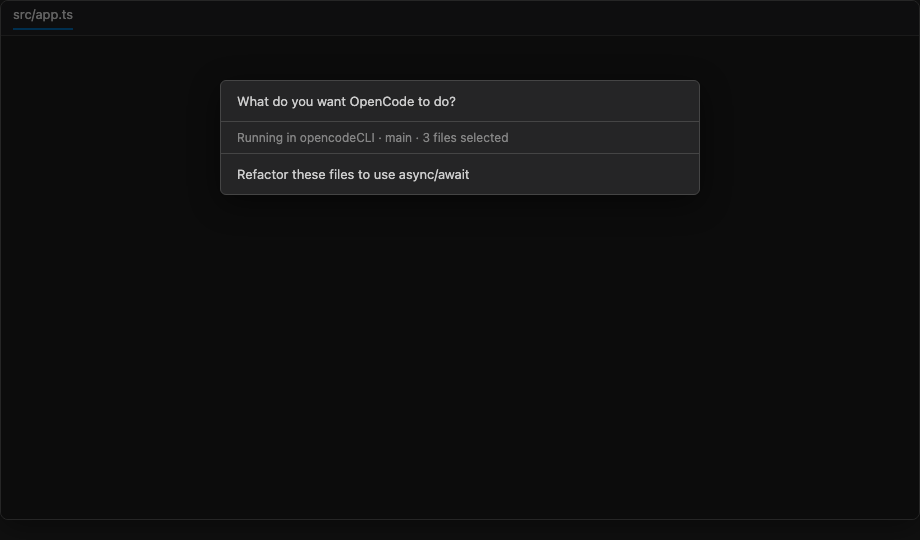
Table of Contents
- Screenshots
- Architecture
- Extension Entry Point
- Activation Events
- Contributions (package.json)
- Project Structure
- Development
- Contributing & Git Workflow
- Testing
- Publishing
- Release History
Architecture
The extension is a plain JavaScript VS Code extension (no transpiler) that follows the standard activate/deactivate lifecycle. It registers commands, status bar items, and contributes a walkthrough, views, and menus declaratively via package.json.
Core Flow
VS Code starts
  └─ Activation events trigger activate()
       ├─ Register 18 commands (all push to context.subscriptions)
       ├─ Create 2 status bar items (OpenCode + Agents)
       └─ All commands use sendToTerminal() except:
            ├─ showWalkthrough → opens the walkthrough page
            ├─ showActions    → opens a quick-pick menu
            └─ showCliHelp    → opens a CLI reference quick-pick
sendToTerminal()
The shared utility function routes command output to the VS Code integrated terminal:
function sendToTerminal(text) {
  const terminal = vscode.window.activeTerminal
    ?? vscode.window.createTerminal('OpenCode');
  terminal.show();
  terminal.sendText(text);
}
- Reuses the active terminal if one exists.
- Falls back to creating a new terminal named
OpenCode. - Focuses the terminal before sending text.
Extension Entry Point
File: extension.js
Module Exports
module.exports = { activate, deactivate };
Lifecycle
| Function | Description |
|---|---|
activate(context) |
Registers all commands, creates status bar items, pushes all disposables to context.subscriptions |
deactivate() |
No-op; cleanup handled by VS Code disposing subscriptions |
Commands Registered
| Command | Handler | Terminal Command |
|---|---|---|
opencode-walkthrough.showWalkthrough |
Opens walkthrough via workbench.action.openWalkthrough |
— |
opencode-walkthrough.install |
sendToTerminal |
curl -fsSL https://opencode.ai/install \| bash (or npm install -g opencode-ai on Windows) |
opencode-walkthrough.runInline |
input box + terminal | opencode run "your prompt" |
opencode-walkthrough.runInteractive |
sendToTerminal |
opencode |
opencode-walkthrough.createAgent |
sendToTerminal |
opencode agent create |
opencode-walkthrough.listAgents |
sendToTerminal |
opencode agent list |
opencode-walkthrough.addMcp |
sendToTerminal |
opencode mcp add |
opencode-walkthrough.listMcp |
sendToTerminal |
opencode mcp list |
opencode-walkthrough.showActions |
vscode.window.showQuickPick with 16 actions |
— |
opencode-walkthrough.showCliHelp |
vscode.window.showQuickPick with 14 CLI reference items |
— |
opencode-walkthrough.authLogin |
sendToTerminal |
opencode auth login |
opencode-walkthrough.authList |
sendToTerminal |
opencode auth ls |
opencode-walkthrough.listModels |
sendToTerminal |
opencode models |
opencode-walkthrough.sessionList |
sendToTerminal |
opencode session list |
opencode-walkthrough.stats |
sendToTerminal |
opencode stats |
opencode-walkthrough.upgrade |
sendToTerminal |
opencode upgrade |
opencode-walkthrough.serve |
sendToTerminal |
opencode serve |
opencode-walkthrough.web |
sendToTerminal |
opencode web |
Status Bar Items
| Priority | Alignment | Text | Tooltip | Command on Click |
|---|---|---|---|---|
| 100 | Left | $(terminal) OpenCode |
OpenCode — Click to run an action | opencode-walkthrough.showActions |
| 99 | Left | $(robot) Agents |
OpenCode Agents — Click to list agents | opencode-walkthrough.listAgents |
Quick Pick Menus
showActions — 16 items:
$(book) Show Walkthrough
$(cloud-download) Install CLI
$(play) Run Inline Prompt
$(terminal) Start Interactive
$(robot) Create Agent
$(list-tree) List Agents
$(key) Auth Login
$(key) Auth List
$(plug) Add MCP Server
$(list-tree) List MCP Servers
$(symbol-parameter) List Models
$(list-tree) List Sessions
$(graph) Stats
$(server) Start Server
$(globe) Start Web
$(arrow-up) Upgrade CLI
showCliHelp — 14 CLI reference items with command descriptions:
Activation Events
The extension activates lazily on any of these triggers (package.json activationEvents):
| Event | Trigger |
|---|---|
onCommand:opencode-walkthrough.showWalkthrough |
Running the Show Walkthrough command |
onCommand:opencode-walkthrough.install |
Running Install CLI |
onCommand:opencode-walkthrough.runInline |
Running Run Inline Prompt |
onCommand:opencode-walkthrough.runInteractive |
Running Start Interactive Session |
onWalkthrough:opencode.gettingStarted |
Opening the walkthrough |
onView:opencode-walkthrough.overview |
Revealing the sidebar view |
onCommand:opencode-walkthrough.showActions |
Running Show Actions |
onCommand:opencode-walkthrough.createAgent |
Running Create Agent |
onCommand:opencode-walkthrough.listAgents |
Running List Agents |
onView:opencode-walkthrough.mcp |
Revealing the MCP panel view |
onCommand:opencode-walkthrough.addMcp |
Running Add MCP Server |
onCommand:opencode-walkthrough.listMcp |
Running List MCP Servers |
onCommand:opencode-walkthrough.authLogin |
Running Auth Login |
onCommand:opencode-walkthrough.authList |
Running Auth List |
onCommand:opencode-walkthrough.listModels |
Running List Models |
onCommand:opencode-walkthrough.sessionList |
Running List Sessions |
onCommand:opencode-walkthrough.stats |
Running Stats |
onCommand:opencode-walkthrough.upgrade |
Running Upgrade CLI |
onCommand:opencode-walkthrough.serve |
Running Start Server |
onCommand:opencode-walkthrough.web |
Running Start Web Interface |
onCommand:opencode-walkthrough.showCliHelp |
Opening CLI Help quick pick |
Contributions (package.json)
View Containers
Two view containers are contributed:
Activity Bar — opencode-walkthrough
- ID:
opencode-walkthrough - Title: “OpenCode”
- Icon:
media/opencode-icon.png
Panel — opencode-mcp
- ID:
opencode-mcp - Title: “MCP Servers”
- Icon:
media/opencode-icon.png
Views
| Container ID | View ID | Type | Name |
|---|---|---|---|
opencode-walkthrough |
opencode-walkthrough.overview |
tree | OpenCode |
opencode-mcp |
opencode-walkthrough.mcp |
tree | MCP Servers |
Commands
18 commands contributed with $(product-icon) references:
{
  "opencode-walkthrough.showWalkthrough": "$(book)",
  "opencode-walkthrough.install":          "$(cloud-download)",
  "opencode-walkthrough.runInline":        "$(play)",
  "opencode-walkthrough.runInteractive":   "$(terminal)",
  "opencode-walkthrough.createAgent":      "$(robot)",
  "opencode-walkthrough.listAgents":       "$(list-tree)",
  "opencode-walkthrough.authLogin":        "$(key)",
  "opencode-walkthrough.authList":         "$(key)",
  "opencode-walkthrough.addMcp":           "$(plug)",
  "opencode-walkthrough.listMcp":          "$(list-tree)",
  "opencode-walkthrough.listModels":       "$(symbol-parameter)",
  "opencode-walkthrough.sessionList":      "$(list-tree)",
  "opencode-walkthrough.stats":            "$(graph)",
  "opencode-walkthrough.serve":            "$(server)",
  "opencode-walkthrough.web":              "$(globe)",
  "opencode-walkthrough.upgrade":          "$(arrow-up)",
  "opencode-walkthrough.showActions":      "(no icon)",
  "opencode-walkthrough.showCliHelp":      "$(question)"
}
Views Welcome
Sidebar view (opencode-walkthrough.overview):
OpenCode is a CLI for AI-assisted software engineering tasks.

[Show Walkthrough](command:opencode-walkthrough.showWalkthrough)
[Install CLI](command:opencode-walkthrough.install)
[Run Inline Prompt](command:opencode-walkthrough.runInline)
[Run on Project Files](command:opencode-walkthrough.runOnProject)
[Start Interactive Session](command:opencode-walkthrough.runInteractive)
[Create Agent](command:opencode-walkthrough.createAgent)

[Agents Overview](command:opencode-walkthrough.showAgents)
[Models Overview](command:opencode-walkthrough.showModels)

[CLI Help](command:opencode-walkthrough.showCliHelp)
[Tips & Tricks](command:opencode-walkthrough.showTips)
[Read Documentation](https://opencode.ai)
MCP Panel view (opencode-walkthrough.mcp):
Manage Model Context Protocol servers for OpenCode.

[Add MCP Server](command:opencode-walkthrough.addMcp)
[List MCP Servers](command:opencode-walkthrough.listMcp)

[Read MCP Docs](https://opencode.ai/docs/mcp-servers/)
Menus
menubar — Help menu bar integration:
| Menu | Item |
|---|---|
| Help → OpenCode CLI (submenu) | CLI Help, Run Inline, Interactive, Create Agent, List Agents, Auth Login, Auth List, Add MCP, List MCP, List Models, List Sessions, Stats, Serve, Web, Upgrade |
view/title — Toolbar buttons shown in view headers:
| View | Buttons |
|---|---|
opencode-walkthrough.overview |
Show Walkthrough, Install CLI, Run Inline Prompt, Start Interactive, Create Agent, CLI Help |
opencode-walkthrough.mcp |
Add MCP Server, List MCP Servers |
explorer/context — Explorer right-click (only on folders):
- Shows submenu
opencode-walkthrough.submenu
Submenus
ID: opencode-walkthrough.submenu — Label: “OpenCode”
ID: opencode-walkthrough.helpSubmenu — Label: “OpenCode CLI” (shown in Help menu)
Items when right-clicking a folder:
| Command | Title |
|---|---|
opencode-walkthrough.runInline |
OpenCode: Run Inline Prompt |
opencode-walkthrough.runInteractive |
OpenCode: Start Interactive Session |
opencode-walkthrough.createAgent |
OpenCode: Create Agent |
opencode-walkthrough.addMcp |
OpenCode: Add MCP Server |
Walkthrough
ID: opencode.gettingStarted — Title: “Get Started with OpenCode”
5 sequential steps:
| Step | ID | Title | Completion Event |
|---|---|---|---|
| 1 | opencode.install |
Install OpenCode | onCommand:opencode-walkthrough.install |
| 2 | opencode.runInline |
Run a Prompt | onCommand:opencode-walkthrough.runInline |
| 3 | opencode.runInteractive |
Start Interactive Mode | onCommand:opencode-walkthrough.runInteractive |
| 4 | opencode.createAgent |
Create an Agent | onCommand:opencode-walkthrough.createAgent |
| 5 | opencode.tips |
Tips & Best Practices | onView:terminal, onLink:https://opencode.ai |
Each step has a markdown media file in walkthroughs/ (e.g. 01-install.md) and an SVG illustration in media/walkthrough/.
Start Entries
A “folder” category start entry is contributed:
- Title: “Get Started with OpenCode”
- Command:
opencode-walkthrough.showWalkthrough
Project Structure
opencode-vscode-walkthrough/
├── .vscode/
│   └── launch.json              # Debug configs: Run Extension + Extension Tests
├── .vscode-test.mjs             # Test runner config (mocha TDD, user-data-dir)
├── .vscodeignore                # Files excluded from VSIX packaging
├── .env.example                 # Environment variables template
├── extension.js                 # Main extension entry point
├── package.json                 # Manifest with all contributions
├── media/
│   ├── opencode-icon.png        # PNG icon (128x128, for marketplace)
│   ├── opencode-icon.svg        # SVG source (codicon-style, not packaged)
│   └── walkthrough/
│       ├── agent.svg
│       ├── inline.svg
│       ├── install.svg
│       ├── interactive.svg
│       └── tips.svg
├── walkthroughs/
│   ├── 01-install.md
│   ├── 02-run-inline.md
│   ├── 03-run-interactive.md
│   ├── 04-create-agent.md
│   └── 05-tips.md
└── test/
    └── extension.test.js        # 7 integration tests
File Details
| File | Purpose |
|---|---|
extension.js |
Plain JS. Registers 18 commands + 2 status bar items. |
package.json |
Manifest with all contributions: views, menus, walkthrough, 18 commands, submenus. |
.vscodeignore |
Excludes .vscode-test/, test/, SVG icons, etc. from VSIX. |
.vscode-test.mjs |
ES module config for @vscode/test-cli. Uses /tmp for user-data-dir to avoid macOS socket path length limit. |
Development
Prerequisites
- VS Code 1.74+
- Node.js 18+
- OpenCode CLI (optional, for testing commands)
Regenerate README screenshots (requires Playwright):
npm run screenshots
Configuration Settings
This extension contributes OpenCode CLI settings that can be configured in Settings → OpenCode. Each maps to a CLI environment variable (full list) and is automatically exported when running commands.
| Setting | Env Variable | Type |
|---|---|---|
opencode.configPath |
OPENCODE_CONFIG |
string |
opencode.configDir |
OPENCODE_CONFIG_DIR |
string |
opencode.tuiConfigPath |
OPENCODE_TUI_CONFIG |
string |
opencode.autoShare |
OPENCODE_AUTO_SHARE |
boolean |
opencode.modelsUrl |
OPENCODE_MODELS_URL |
string |
opencode.serverPassword |
OPENCODE_SERVER_PASSWORD |
string |
opencode.serverUsername |
OPENCODE_SERVER_USERNAME |
string |
opencode.logLevel |
--log-level flag |
enum |
opencode.disableAutoUpdate |
OPENCODE_DISABLE_AUTOUPDATE |
boolean |
opencode.disablePrune |
OPENCODE_DISABLE_PRUNE |
boolean |
opencode.disableTerminalTitle |
OPENCODE_DISABLE_TERMINAL_TITLE |
boolean |
opencode.disableDefaultPlugins |
OPENCODE_DISABLE_DEFAULT_PLUGINS |
boolean |
opencode.disableLspDownload |
OPENCODE_DISABLE_LSP_DOWNLOAD |
boolean |
opencode.disableAutoCompact |
OPENCODE_DISABLE_AUTOCOMPACT |
boolean |
opencode.disableClaudeCode |
OPENCODE_DISABLE_CLAUDE_CODE |
boolean |
opencode.disableModelsFetch |
OPENCODE_DISABLE_MODELS_FETCH |
boolean |
opencode.enableExa |
OPENCODE_ENABLE_EXA |
boolean |
opencode.experimental |
OPENCODE_EXPERIMENTAL |
boolean |
opencode.experimental.planMode |
OPENCODE_EXPERIMENTAL_PLAN_MODE |
boolean |
opencode.experimental.backgroundSubagents |
OPENCODE_EXPERIMENTAL_BACKGROUND_SUBAGENTS |
boolean |
opencode.experimental.nativeLlm |
OPENCODE_EXPERIMENTAL_NATIVE_LLM |
boolean |
opencode.experimental.scout |
OPENCODE_EXPERIMENTAL_SCOUT |
boolean |
opencode.experimental.workspaces |
OPENCODE_EXPERIMENTAL_WORKSPACES |
boolean |
Settings are read when sending terminal commands and prepended as export statements.
Environment Variables
Copy .env.example to .env and configure your paths and tokens:
cp .env.example .env
| Variable | Description |
|---|---|
EXTENSION_PATH |
Absolute path to the extension directory |
VSCE_PAT |
VS Code Marketplace PAT (docs) |
OVSX_PAT |
Open VSX Registry PAT (open-vsx.org) |
Setup
npm install
Run Extension
Launch the Extension Development Host (opens a new Cursor/VS Code window with this extension loaded):
npm run run
This runs scripts/run-extension.js, which looks for a supported IDE CLI on your PATH in this order: code (VS Code) → code-insiders (VS Code Insiders) → cursor. If none are found, it prints download links for each editor. Override paths with environment variables:
| Variable | Default | Purpose |
|---|---|---|
EXTENSION_PATH |
Repository root | Directory containing package.json |
WORKSPACE_FOLDER |
Same as extension path | Folder opened in the dev host |
Alternatives:
- Press F5 in VS Code/Cursor with the Run Extension launch config (
.vscode/launch.json). -
CLI directly (replace
codewithcode-insidersorcursoras needed):code --extensionDevelopmentPath="/absolute/path/to/opencodeCLI" "/absolute/path/to/opencodeCLI"
For more on sideloading extensions, see the VS Code extension marketplace docs.
Package
npx @vscode/vsce package
Outputs opencode-walkthrough-0.0.1.vsix.
Contributing & Git Workflow
We use GitHub Flow with Conventional Commits, automated CI, and tag-based releases.
| Topic | Guide |
|---|---|
| Full git workflow | .github/GIT_WORKFLOW.md |
| Contributing | CONTRIBUTING.md |
| Branch protection (rulesets) | .github/branch-protection.md |
| Ruleset definition | .github/rulesets/master-protection.json |
| Good first issues | Issue #17 |
git checkout -b feat/my-change
npm run validate && npm test
git commit -m "feat: describe change"
gh pr create --title "feat: describe change"
Enable the commit template: git config commit.template .gitmessage
Testing
Uses @vscode/test-cli with @vscode/test-electron.
Test Suite
Tests in test/extension.test.js cover activation, command registration, and manifest validity:
| Test | Description |
|---|---|
| Extension is installed and activates | Verifies extension is found and active |
| All commands are registered | Asserts all 18 expected commands exist |
| Commands can be executed | Runs showWalkthrough without error |
| Status bar items are created | Verifies createStatusBarItem API availability |
| Views are contributed | Verifies createTreeView API availability |
| Extension manifest is valid | Checks name, publisher, contributes fields |
| Walkthrough step can be opened | Opens walkthrough via workbench.action.openWalkthrough |
Run Tests
npm test
The config .vscode-test.mjs sets user-data-dir to a short /tmp path to avoid the macOS IPC socket 103-character limit.
Debug Tests
Use the “Extension Tests” launch config in .vscode/launch.json.
Publishing
VS Code Marketplace
Publish using the token from your .env or pass it directly:
source .env && npx @vscode/vsce publish -p "$VSCE_PAT"
See the VS Code extension marketplace docs for token setup.
Open VSX Registry
source .env && npx ovsx publish opencode-walkthrough-0.0.1.vsix -p "$OVSX_PAT"
Get a token at https://open-vsx.org/user-settings/tokens
Release History
See CHANGELOG.md for detailed notes. Tags link to GitHub Releases.
| Tag | Highlights |
|---|---|
| v0.19.0 | Run on Project Files command with file picker, branch detection, and keybinding |
| v0.18.0 | Keyboard shortcuts for main commands; shortcuts listed in sidebar welcome |
| v0.17.1 | Configuration settings table for OpenCode CLI environment variables |
| v0.17.0 | OpenCode configuration settings mapped to CLI environment variables |
| v0.16.0 | Stats toolbar button in editor title and sidebar |
| v0.15.1 | Run Inline shows version, configured providers, and available models |
| v0.15.0 | Install check before run; version notification and GitHub install link |
| v0.14.0 | Verify OpenCode install before install command; show version if present |
| v0.13.0 | .env setup for paths and credentials; marketplace documentation links |
| v0.12.0 | Help menu integration, 9 new CLI commands, secondary sidebar view, 18 total commands |
| v0.11.1 | Add sudo to install command |
| v0.11.0 | Architectural README documenting all components |
| v0.10.0 | Comprehensive README |
| v0.9.0 | Replace SVG icon with PNG for marketplace |
| v0.8.0 | Integration test suite (7 tests) |
| v0.7.0 | Explorer context menu, Create Agent step, Agents status bar |
| v0.6.0 | MCP Servers panel view container |
| v0.5.0 | Welcome views (replaced tree item buttons) |
| v0.4.0 | Status bar quick-pick actions |
| v0.3.0 | Activity bar with sidebar view |
| v0.2.0 | Professional icon and manifest fields |
| v0.1.0 | Initial walkthrough and command palette |
Known Issues
None. Report at GitHub Issues.
Contributing
See CONTRIBUTING.md.
Contributors
Thanks to everyone who contributes to this project. See CONTRIBUTORS.md for credits.